---
title: "Make Sure You Do This Before Switching To Signals in App Development Testing"
url: "https://www.cypress.io/blog/switching-to-signals-angular"
description: "Discover the evolution of Angular's ecosystem as signals take the spotlight. Read more to explore the integration & impact of signals in app development…"
---
# Make Sure You Do This Before Switching To Signals in App Development Testing
April 19, 2023
By Jordan Powell

> _This blog post was originally published on [dev.to](https://dev.to/angular/make-sure-you-do-this-before-switching-to-signals-27m9?ref=cypress-io.ghost.io)._
This time last year Standalone Component's were the talk of the Angular town. This year `signals` have replaced that buzz throughout the Angular Ecosystem. Though it will take some time for the introduction of `signals` into Angular's ecosystem to take hold, it is important for us to begin thinking about how these changes may or may not affect our applications. In fact, I am proposing **one thing that everyone should do before switching to `signals`**. But before I get to that, let's first learn what signals are.
## What Are Signals in Web Development Anyways?
> _For those interested in learning more, you can view [this PR](https://github.com/angular/angular/pull/49091?ref=cypress-io.ghost.io) from the Angular team that introduces signals into Angular_.
For some historical context, `Signals` are not a new concept. In fact, they are the backbone of reactivity in [SolidJS](https://www.solidjs.com/?ref=cypress-io.ghost.io). [The SolidJS documentation](https://www.solidjs.com/tutorial/introduction_signals?ref=cypress-io.ghost.io) describes _Signals_ as the following: "They contain values that change over time; when you change a signal's value, it automatically updates anything that uses it."
**Ok, but how are Signals different from what we currently have in Angular?** The simple answer for many is that they aren't much different from a practical standpoint. But if we dig a little deeper, we will find that Signals solve a long-standing performance and architectural problem Angular has with its current Change Detection mechanism. That mechanism is a library known as [Zone.Js](https://www.npmjs.com/package/zone.js?activeTab=readme&ref=cypress-io.ghost.io). Though it works today, it has some pretty significant performance issues in larger applications that have a lot of changing states. By switching to Signals, we can slowly remove the parts of our applications that depend upon `Zone.js` and replace them with Signals. This will in effect improve the overall performance across our applications.
**Ok, but what about RxJs?** RxJs is a huge part of the Angular Ecosystem! It is used for handling streams of **_asynchronous_** data in our applications. Thankfully, RxJs isn't going anywhere! Signals, however, are being introduced to handle any and all _**synchronous**_ state changes in our Angular applications. I like to think of it as a replacement for any non-RxJs state.
#### In Short:
- Async: RxJs
- Sync: Signals
## What Problems Can Signals Solve?
Now that we know a little bit more about Signals and what problems they solve; let's talk about **the one thing you should do before switching to them**! Let's first look at the problem by looking at a simple example.
Signals affect our Application's state, which in most cases is the most difficult and complex part of our applications. In fact, we want to be REALLY certain that any changes we make aren't causing regression. The best way to assure against this is through **automated testing**. More specifically **UI tests**. However, many unit tests written for Angular Components using Karma will break in the process of switching to `Signals`. This is because they are oftentimes coupled with the implementation of the Component itself.
Let me show you an example below of a simple Standalone `CounterComponent`:
```
import { AsyncPipe } from '@angular/common';
import { Component } from '@angular/core';
import { BehaviorSubject } from 'rxjs'
@Component({
standalone: true,
imports: [AsyncPipe],
template: `
Count: {{ count$ | async }}
`
})
export class CounterComponent {
private count = 0;
private readonly _count = new BehaviorSubject(0);
count$ = this._count.asObservable()
increment(): void {
this.count ++;
this._count.next(this.count)
}
decrement(): void {
this.count --;
this._count.next(this.count)
}
}
```
A typical Karma Unit Test for this component would look like the following:
```
import { ComponentFixture, TestBed } from '@angular/core/testing';
import { CounterComponent } from './counter.component';
describe('CounterComponent', () => {
let component: CounterComponent;
let fixture: ComponentFixture;
beforeEach(async () => {
imports: [CounterComponent]
}).compileComponents();
fixture = TestBed.createComponent(CounterComponent);
component = fixture.componentInstance;
fixture.detectChanges();
it('should create', () => {
expect(component).toBeTruthy();
});
it('can increment the count', () => {
const compiled = fixture.nativeElement as HTMLElement;
const count = compiled.querySelector("#count");
expect(count?.textContent).toContain(0);
const button = fixture.debugElement.nativeElement.querySelector('#increment')
button.click();
fixture.detectChanges();
expect(count?.textContent).toContain(1);
});
it('can decrement the count', () => {
const compiled = fixture.nativeElement as HTMLElement;
const count = compiled.querySelector("#count");
expect(count?.textContent).toContain(0);
const button = fixture.debugElement.nativeElement.querySelector('#decrement')
button.click();
fixture.detectChanges();
expect(count?.textContent).toContain(-1);
})
});
```
Now we can run our test to validate it works by running:
```
ng test --watch
```
We should now seeing the following output:

Now we can go ahead and refactor our component to use Signals:
```
import { Component, signal } from '@angular/core';
@Component({
standalone: true,
template: `
Count: {{ count() }}
`
})
export class CounterComponent {
count = signal(0)
increment(): void {
this.count.update(c => c = c + 1);
}
decrement(): void {
this.count.update(c => c = c - 1);
}
}
```
Now if we return to our test we will continue to see the following output:

Though this example works, it isn't always this trivial. Let's revert those changes we just made and I will show you more complex unit tests that will eventually fail after switching to `signals`.
```
describe('CounterComponent', () => {
let component: CounterComponent;
let fixture: ComponentFixture;
beforeEach(async () => {
imports: [CounterComponent]
}).compileComponents();
fixture = TestBed.createComponent(CounterComponent);
component = fixture.componentInstance;
fixture.detectChanges();
it('increments count$ when calling increment()', () => {
component.increment();
component.count$.pipe(
take(1)
).subscribe((value) => {
expect(value).toEqual(1)
})
})
it('decrements count$ when calling decrement()', () => {
component.decrement();
component.count$.pipe(
take(1)
).subscribe((value) => {
expect(value).toEqual(-1)
})
})
```
If we return to our RxJs implementation and run our tests we just wrote, we will see 5 successful tests passing.

But, if we refactor our `CounterComponent` to use signals again, we will now see the following error in our Code Editor.
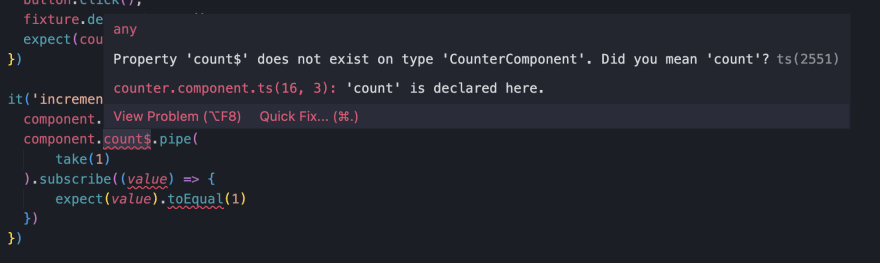
As you can see, most tests that test the logic in our Component's class directly will inevitably fail after refactoring to signals. **To avoid this issue and improve the overall developer experience and quality of our tests, let's add Cypress Component Tests**
## Getting Started With Component Testing
If you haven't already done so let's add [Component Testing](https://docs.cypress.io/guides/component-testing/overview?ref=cypress-io.ghost.io) to our application.
```
npm i cypress -D
```
Now we can launch Cypress and click on Component Testing:
```
npx cypress open
```

Now you can simply follow Cypress's Configuration Wizard to setup Component Testing in your application (if you haven't already done so). You can follow my video below for a more detailed guide to getting started with Angular Component Testing.
## Writing Cypress Component Tests
Now that we have Cypress Component Testing configured let's create a Cypress Component test for the `CounterComponent`.
```
import { CounterComponent } from "./counter.component"
describe('CounterComponent', () => {
it('can mount and display an initial value of 0', () => {
cy.mount(CounterComponent)
cy.get('#count').contains(0)
})
it('can increment the count', () => {
cy.mount(CounterComponent)
cy.get('#increment').click()
cy.get('#count').contains(1)
})
it('can decrement the count', () => {
cy.mount(CounterComponent)
cy.get('#decrement').click()
cy.get('#count').contains(-1)
})
})
```
Now we can run the `counter.component.cy.ts` spec and we should get the following:

Now let's go ahead and re-run our tests using the `signals` implementation and we will see the same result. Not only were the Cypress tests significantly **easier to write**, they also provide additional value that our Karma test runner did not. We are now able to interact with our component in our test runner itself and verify its output _(as opposed to a tiny green dot)_. [Read more about the example repo](https://github.com/jordanpowell88/angular-counter?ref=cypress.io)
## Answer: Use High Quality UI Tests
**TLDR:** Angular is on 🔥! Signals, Standalone, SSR and so much more. Though the impacts of Signals are yet to be known as of this writing, I think that the safest way forward is to use high-quality UI tests.
Admittedly I am biased, but I believe that [Cypress Component Tests](https://docs.cypress.io/guides/component-testing/angular/overview?ref=cypress-io.ghost.io) are the best tool for this job. They are simpler to write and they encourage you to write the UI tests we talked about in this article. In the end, which tool you use is up to you and your team. The most important thing is that you feel confident that the side effects caused by refactoring to `signals` are caught before your users do!
Unleash the complete capabilities of Cypress test automation tools in your CI pipeline with Cypress Cloud. Seamlessly scale your Cypress testing and confidently deploy your code without hesitation. [Get started today by signing up for your complimentary Cypress Cloud account.](https://cloud.cypress.io/login?ref=cypress-io.ghost.io)